

Know Your Numbers
Before They Hurt You.
Make the next decision with your numbers in front of you.
Inside Pulse
See it in your day.
Make the next decision with your numbers in front of you.
Your business, in view.
Membership, check-ins and plan mix. See the patterns behind the day-to-day.
Explore reports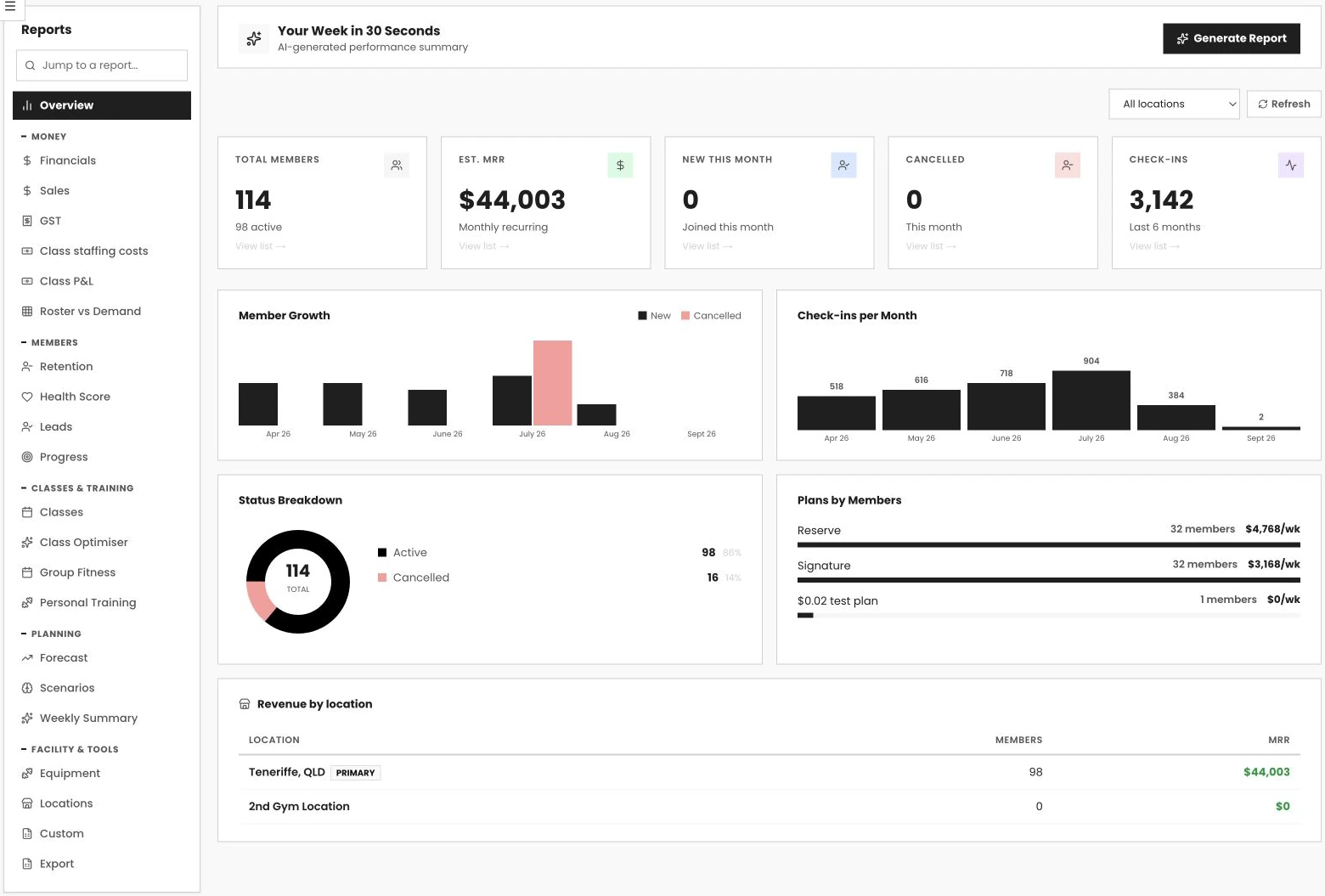 Swipe to explore · tap to enlarge
- 01See the big picture
- 02Explore the trends
- 03Plan your next move
See which classes make money.
See what each class nets after staff, fees and its share of the rent.
See class profitability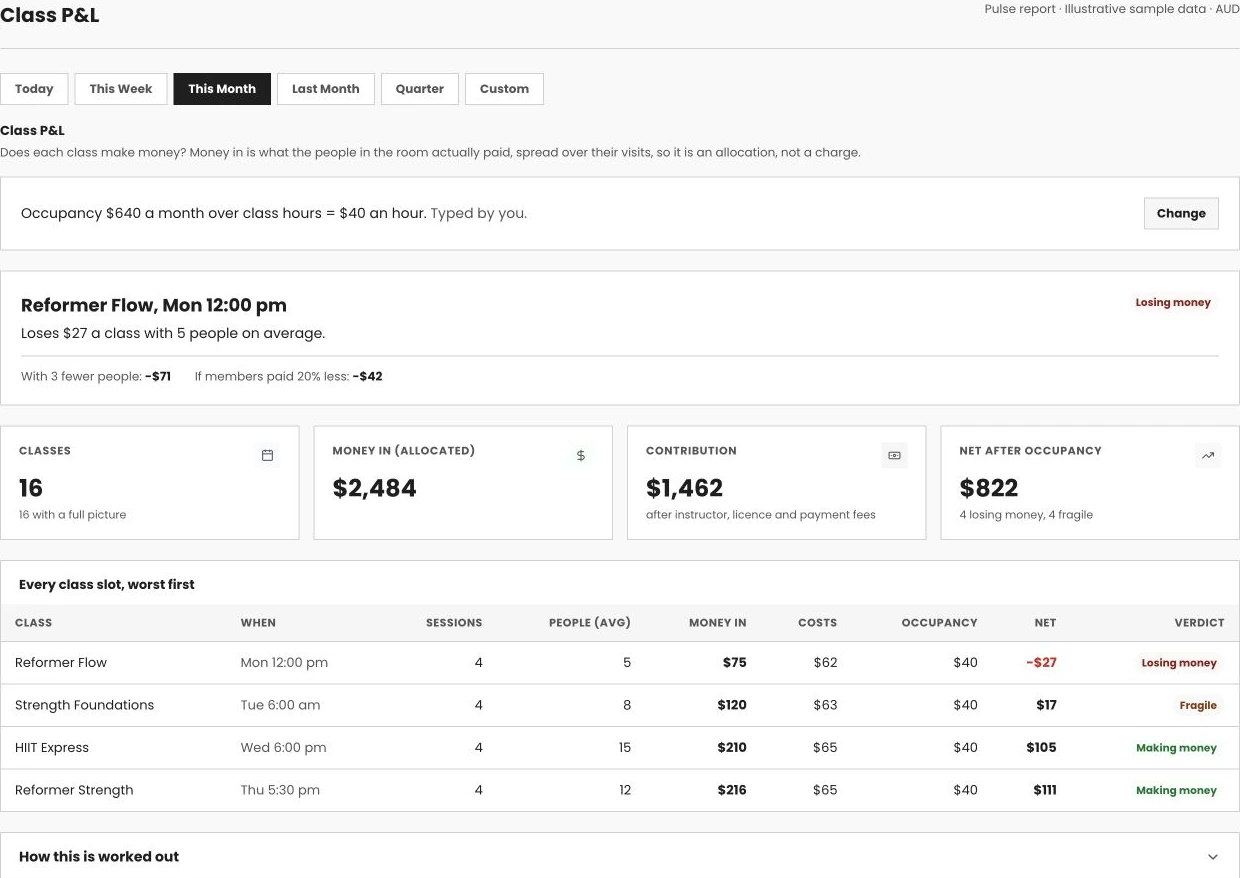 Swipe to explore · tap to enlarge
- 01Include your real costs
- 02See the weaker slots
- 03Decide what to change
How reports & analytics works in Pulse
VERVE Pulse's reports hub covers financials, GST for BAS time, labour costs against your roster, and a 12-month revenue forecast, all reading live from the same billing and attendance data running your gym. No export, no reconciling two systems, no finding out about a bad month after it's already over.
Running a gym on the vibe of how the month felt is how good months quietly go bad.
Gym reporting and analytics software turns the billing, attendance and sales data your gym already generates into reports you can actually make a decision from: revenue by stream, GST ready for BAS, labour cost against your roster, and a forecast for where the gym will be in six or twelve months. It's the difference between knowing your gym felt busy this month and knowing whether it actually made more money than last month, and why.
The pain here is that most gym owners find out something's wrong after it's already a problem: a wage bill that crept up over three months without anyone noticing, a GST figure the bookkeeper has to chase down manually every quarter, a location quietly underperforming the other three while the group looks fine on paper. None of that shows up in a daily gut check. It shows up in a report, if you have one that's actually current.
VERVE Pulse solves this by running reporting off the same live data as everything else: check-ins, billing, class attendance and sales all sit in one system, so the reports hub is never working from a stale export. The GST summary is built for Australian quarters. The labour report shows wage percentage and a roster-versus-demand heatmap, gated behind a finance permission so owners decide who sees pay data. Revenue forecasting projects 12 months out with editable assumptions, so you can test a decision before you make it in real life.
Multi-location groups get a locations report comparing sites side by side, with GST and financials still clean per entity underneath the consolidated HQ view. And because your data is yours, full export, whole-gym JSON or per-dataset CSV, is free on every plan, with an open API on Pro if you want to build your own dashboards on top of it.
This is built for owners who want to run the gym on numbers, not on how busy the front desk felt on Tuesday. Switching in doesn't mean losing your reporting history: VERVE Pulse imports from Mindbody, GymMaster, Glofox, Hapana, PushPress, Zen Planner and WellnessLiving, migration is A$990, free on annual plans, and gyms are typically live within 48 hours, with reports building from real data from week one.
One reports hub covering money, members, classes and planning, not six separate exports stitched together.
The reports hub groups everything into Overview, Money, Members, Classes & Training, Planning, and Facility & Tools, so you know exactly where to look instead of hunting through a long flat menu of report names.
Financials with compare-to-previous
A date-range money view shows revenue by stream and compares directly to the previous period, so you can see at a glance whether this month actually beat last month, not just whether it felt busy.
CSV exports on the big reports
The reports that matter most for a bookkeeper or an accountant export straight to CSV, so handing off your numbers at tax time doesn't mean re-typing figures from a screen.
AI weekly summary every Monday
An AI-written weekly summary lands in your inbox every Monday morning, giving you the headline numbers before you've even opened the dashboard, so a busy week doesn't mean a missed one.
Members report: retention, health score, leads
The Members section of the hub rolls retention, the financial health score and lead conversion into one grouping, so growth and churn sit side by side rather than in separate tabs.
A GST summary built for Australian quarters, and a labour report that shows what your roster is actually costing you.
BAS time doesn't mean chasing GST out of a general revenue report. Labour reporting shows wage percentage and a roster-versus-demand heatmap, with pay data gated behind a finance permission so owners choose who sees it.
GST summary for Australian quarters
The GST summary report is built around Australian BAS quarters, giving you a clean figure ready for lodgement instead of a generic revenue report you have to manually pull GST out of.
Nightly Xero sync, Pro
Invoices, payments and account mapping sync to Xero every night on Pro, so your accounting software and VERVE Pulse never quietly drift out of step with each other.
Wage percentage and staffing cost
Class staffing costs and wage percentage are reported directly, so you can see how much of your revenue is going to labour without building a separate spreadsheet from payroll exports.
Roster-versus-demand heatmap
A heatmap shows where you're overstaffed against actual demand and where you're stretched thin, with the pay-data view gated behind a finance permission so owners control who sees it.
Test a decision against a 12-month forecast before you make it in real life.
Revenue forecasting with editable assumptions lets you model a price change, a new PT hire, or a marketing push before you commit. A financial health score and anomaly detection on Pro round out the early-warning picture.
12-month revenue forecast
The revenue forecast projects 12 months ahead based on your gym's own growth pattern, giving you a realistic view of where you're headed instead of a guess based purely on last month.
Editable scenario modelling
Change an assumption, like adding a second PT or lifting a plan price, and watch members and revenue compound over the forecast period before you make the change for real.
Financial health score
A single financial health score gives you a fast read on how the gym's actually tracking, useful for a quick gut check before you dive into the detail behind a specific report.
Anomaly detection, Pro
Anomaly detection watches check-ins, signups, cancellations, failed payments and takings against your own same-weekday baseline, and flags what's off before it shows up as a bad month.
Compare every site side by side without losing clean numbers at the individual location level.
The locations report gives multi-site groups an HQ view of revenue, attendance and growth across sites, while GST and financials still stay clean per entity underneath, so nothing gets muddied in the roll-up.
Locations report, side by side
Every location's revenue, attendance and growth sit in one comparison view, so an owner running four sites can spot the one quietly underperforming without pulling four separate exports.
HQ-level consolidated view
Multi-site reporting rolls up to give an HQ-level picture of the whole group, so a quick check of overall performance doesn't require manually adding up four separate dashboards.
Clean per-entity financials underneath
GST and financials remain clean at the individual entity level even inside a consolidated multi-site view, so each location's own books stay accurate for its own accounting.
Revenue attributed per location
Revenue is attributed to the location it was earned at, giving accurate per-site numbers even for members on a passport plan who train across more than one club.
Free full data export on every plan, and a custom report builder for owners who want to go further.
Your data is yours: whole-gym JSON or per-dataset CSV export is free on every plan. On Pro, the custom report builder and an open API let you build exactly the report, or the integration, your gym needs.
Custom report builder, Pro
Pull together the exact combination of metrics your gym cares about, beyond the standard reports hub, and export the result. Built for owners who've already outgrown the default reports.
Free full data export, every plan
Export the whole gym as a JSON file or individual datasets as CSV, whenever you want, on any plan. You're never locked in just to keep access to your own numbers.
Open API for your own BI, Pro
The open API reads and writes data with signed webhooks for real-time events, letting you pipe your gym's numbers into your own BI tool or a spreadsheet model you already trust.
A genuine API, not a locked feed
It's built as a real API you can develop against, the same way you would with any other piece of business software, rather than a restricted, read-only data dump.
See who's converting leads and which classes actually earn their spot on the timetable.
By-salesperson conversion analytics and call and tour reporting sit alongside class, group fitness and PT reporting, so both sides of the business, who's selling and who's coaching, get the same reporting depth.
By-salesperson conversion analytics
See lead-to-trial and trial-to-member conversion rates broken down per team member, so you know who's closing and who needs coaching, rather than relying on gut feel.
Call and tour reporting
Call volume and tour outcomes report alongside conversion, giving a full picture of sales activity, not just the end result, for coaching a team that's underperforming.
Classes, class optimiser, group fitness, PT
The Classes & Training grouping reports on class attendance, the AI schedule optimiser's suggestions, group fitness performance and personal training, all under one heading in the hub.
Full sales picture on the CRM
Sales reporting is one part of a much bigger toolkit, the pipeline, two-way SMS, call logging and lead scoring. See the full detail on our gym CRM page.
Frequently asked questions.
What is gym reporting and analytics software?
Gym reporting and analytics software turns the billing, attendance and sales data your gym already generates into reports you can actually make a decision from: revenue by stream, GST ready for BAS, labour cost against your roster, and a forecast for where you'll be in six or twelve months. VERVE Pulse builds a full reports hub into the platform rather than requiring a separate BI tool, because reporting is only as good as the data underneath it, and that data is more accurate when it never has to be exported and re-imported somewhere else.
How much does gym reporting software cost?
VERVE Pulse's reporting is included in every plan, with no separate reporting module fee. Core at A$199/month +GST already includes the full reports hub, financials, GST summary, revenue forecasting and free data export. Pro at A$549/month +GST adds anomaly detection, a custom report builder and open API access for pulling data into your own BI tools. There's no extra charge for exporting your own numbers, on any plan.
Does VERVE Pulse report on GST for BAS time?
Yes. VERVE Pulse's GST summary report is built specifically for Australian quarters, giving you a clean figure for BAS lodgement without manually pulling GST out of a general revenue report. On Pro, a nightly Xero sync carries invoices, payments and account mapping across automatically, so the numbers in your accounting software and the numbers in VERVE Pulse never drift apart.
Can I forecast gym revenue 12 months ahead?
Yes. VERVE Pulse's revenue forecast projects 12 months out, and scenario modelling lets you edit an assumption, like adding a second PT or raising a plan price, and watch how members and revenue compound over that period before you commit to the change in real life. It's built to answer what if questions using your own historical growth pattern, not a generic industry curve.
Does VERVE Pulse support multi-location reporting?
Yes. The locations report compares revenue, attendance and growth side by side across every site in a group, giving owners an HQ-level view without stitching together separate exports from each location. GST and financials still stay clean per entity underneath the consolidated view, so multi-site reporting rolls up for the owner without breaking each location's own books. It's the same reporting layer that underpins the Chains tier's consolidated billing for growing multi-site groups.
Can I build a custom report in VERVE Pulse?
Yes, on the Pro plan. The custom report builder lets you pull together the exact combination of metrics your gym cares about, rather than relying only on the standard reports hub, and export the result. Below Pro, the reports hub already covers financials, GST, labour, forecasting and locations, so custom reporting is for owners who want to go beyond the standard set.
Can I export my gym's data out of VERVE Pulse?
Yes, and it's free on every plan. Full data export gives you the whole gym as a JSON file, or individual datasets as CSV, whenever you want it, with no waiting period and no export fee. VERVE Pulse's position is that your data is yours: you're never locked into staying on the platform just to keep access to your own member, billing and attendance history.
Does VERVE Pulse have an API for my own reporting tools?
Yes. VERVE Pulse's open API on the Pro plan supports both reading and writing data, with signed webhooks for real-time events, so you can pull your gym's numbers into your own BI tool or a spreadsheet model you already trust. It's a genuine API, not a locked-down export feed: you can build against it the way you would with any other business software.
Is there a free trial for VERVE Pulse's reporting tools?
Yes. VERVE Pulse has a 30-day free trial with every Pro plan feature. You add a card to start, and nothing is charged until the 30 days are up; cancel before then and you pay nothing. After the trial you are billed for the plan you chose. The full reports hub, financials, GST summary and forecasting are live on Core from day one. Start your free trial, or book a demo and our team will walk you through real reports built on sample gym data, including the multi-location view and the custom report builder on Pro, so you can see exactly what you'd be running your decisions on.
How does VERVE Pulse's reporting compare to spreadsheets or a standalone BI tool?
A spreadsheet or standalone BI tool is only as current as the last manual export, and someone has to remember to do that export before the numbers are trustworthy. VERVE Pulse's reports read live from the same billing, attendance and sales data running your gym, so the GST summary, the forecast and the locations report are always current without anyone pulling a CSV. The Pro-tier open API still lets you feed that same live data into your own BI tool if you want to build on top of it.
More of the platform.
Billing & Payments
Cards and Australian BECS direct debit built in, with failed payment recovery that chases the money for you.
AI Gym Management
Churn prediction, a business coach and revenue forecasting, all running on your gym's own numbers.
Staff Management
Roles, rostering, payroll export and a coach portal built for the floor, not the owner's laptop.
Multi-Location
One login across every site, with consolidated billing and reporting that scales as you add locations.
Member Retention
Churn prediction, win-back automation and a freeze engine that keeps members you already paid to win.
Gym CRM
A visual pipeline, two-way SMS and AI lead scoring that track every lead from enquiry to signed member.