

Class Scheduling Built for
How Gyms Actually Run.
A clearer timetable for your team. Easier booking for your members.
Inside Pulse
See it in your day.
A clearer timetable for your team. Easier booking for your members.
Keep the day moving.
One timetable for classes, coaches and bookings. Less back-and-forth at the desk.
See how bookings work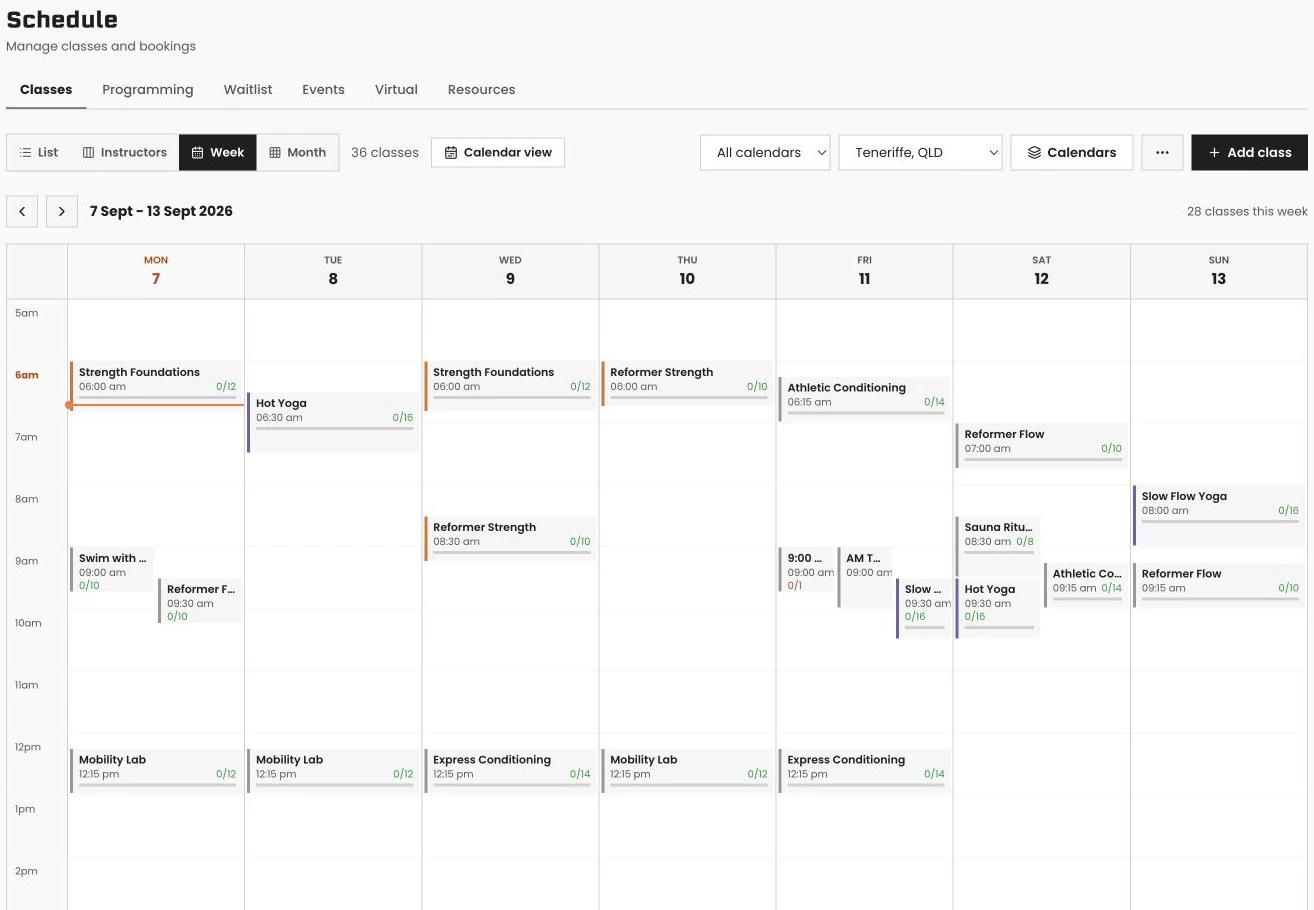 Swipe to explore · tap to enlarge
- 01Plan the timetable
- 02Allocate your coaches
- 03See who's booked
Give the next member their chance.
See who is waiting, for which class, and in what order.
Explore smart waitlists
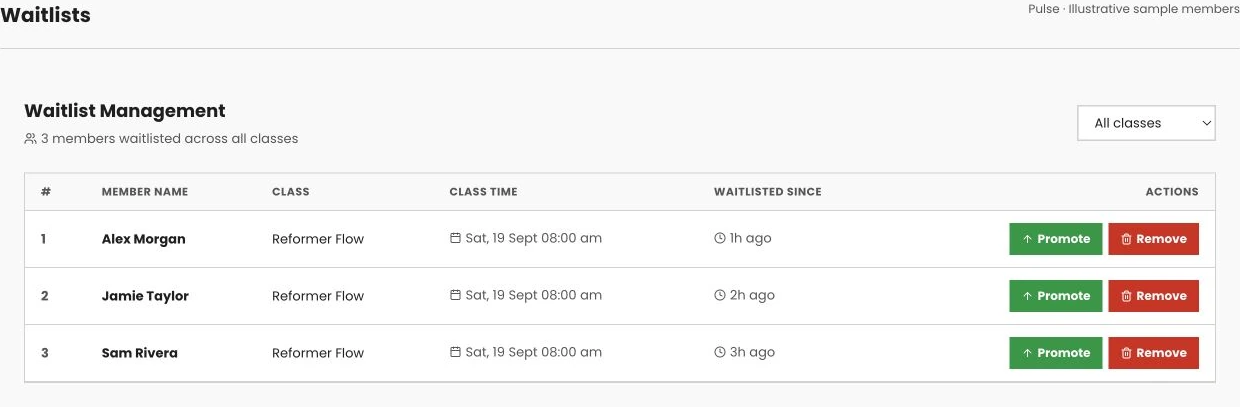 Swipe to explore · tap to enlarge
- 01A class fills up
- 02Members join the queue
- 03Manage the next available place
One less call to reception.
Members can find their next class and book it in the Pulse Member app.
See the member app in a demo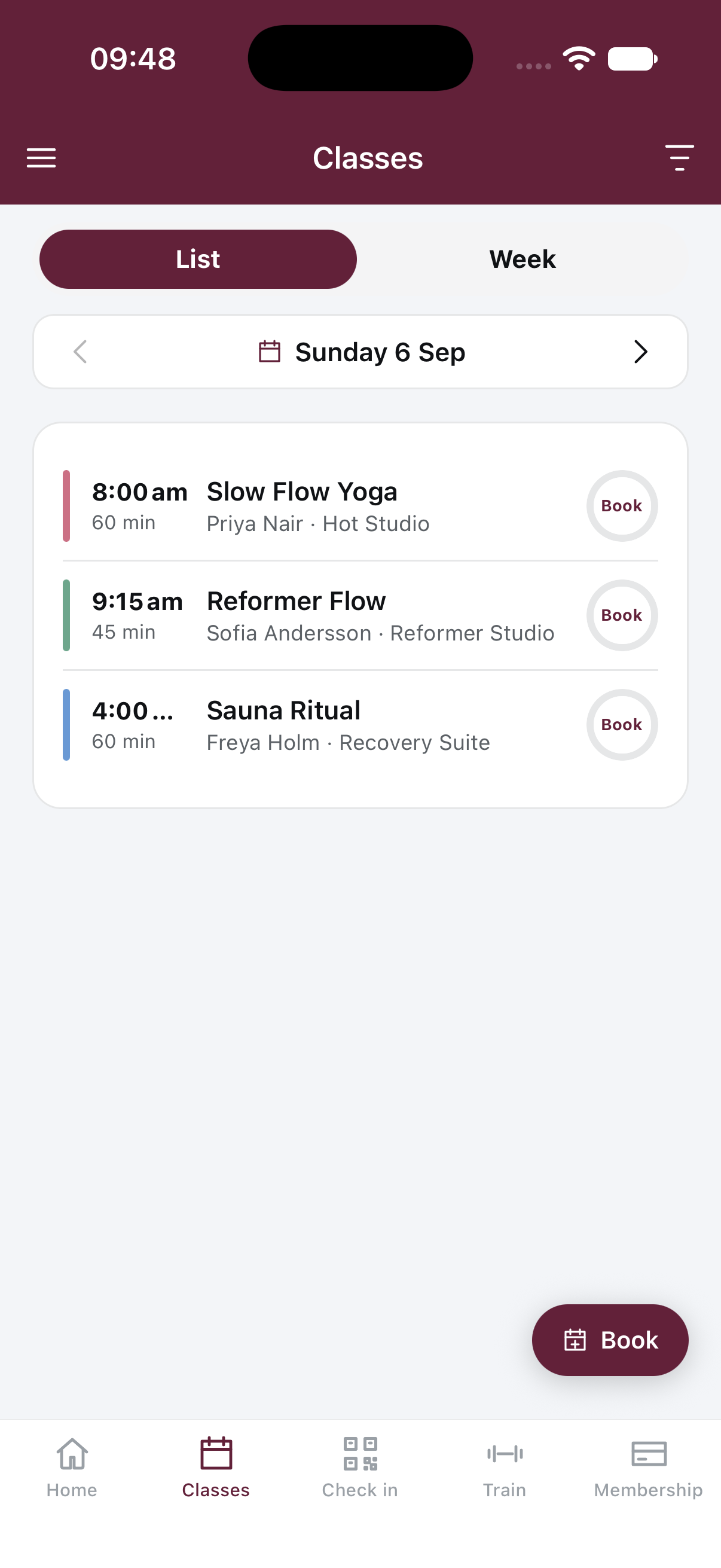 Swipe to explore · tap to enlarge
- 01Find a class
- 02Choose a session
- 03Make the booking
How scheduling & booking works in Pulse
VERVE Pulse's class scheduling handles recurring classes that actually recur, spot booking for reformers and bikes, room and resource bookings for courts and saunas, and PT and tour bookings against real staff availability. Every booking is atomic, so a full class can never oversell. Members book from the app, the portal, or a widget on your own website.
What class scheduling software actually needs to do for a gym that's already busy.
Class scheduling software, sometimes called gym booking software, is the system that builds your timetable and lets members reserve a spot in it: a class, a PT session, a court, or a piece of studio equipment. Done well, nobody thinks about it. Done badly, it's the reason your 6am coach is fielding three phone calls before the first member has even walked in.
Most gyms start with a paper timetable, a shared calendar, or a generic booking tool never built for how a gym actually runs. A recurring Tuesday 6pm class gets rebuilt by hand every school term. Two members call at the same time for the last reformer spot and someone has to sort it out after the fact. A PT books a session that clashes with a tour they already had on the calendar, because the two bookings live in different systems that don't talk to each other.
VERVE Pulse solves this structurally rather than papering over it. Every booking, whether it's a class, a spot on a reformer, a court, or a PT session, is atomic at the database level: a full class can never oversell and two phones can't take the last spot, because the system checks and locks in real time rather than trusting whoever refreshed the page first. Classes that recur, actually recur: the recurrence engine extends a series automatically instead of someone rebuilding it every few weeks, and moving a class time moves the whole series at once. Staff availability for PT and tour bookings comes from one real calendar, not a separate diary, so a session and a tour can never double-book the same coach.
Members book from the app, the portal, or a widget embedded straight into your own website, and every one of those surfaces reads the same live schedule. There's no second system to keep in sync and no risk of the website showing a spot that was already taken on the app five minutes earlier.
This matters most for gyms still running their timetable out of a spreadsheet, a paper roster, or scheduling software bolted onto a platform that was never built for classes in the first place. Switching doesn't mean rebuilding your timetable from scratch: paste your whole weekly schedule into the bulk import tool and it validates before you commit, and for gyms coming from Mindbody, GymMaster, Glofox, Hapana, PushPress, Zen Planner or WellnessLiving, the A$990 concierge migration handles the rest, free on annual plans, typically live within 48 hours.
Classes that recur properly, so nobody rebuilds the timetable by hand every term.
A recurring class in VERVE Pulse is genuinely recurring, not a series you have to re-create every few weeks. Move it once and the whole series moves with it.
A recurrence engine, not a copy-paste habit
Set a class to repeat and the recurrence engine extends the series automatically. Nobody has to remember to add next month's classes before this month runs out, and if a time changes, you move the whole series at once instead of editing each occurrence.
Duplicate-a-class and month view
Building a new class from scratch is rarely necessary: duplicate an existing one as your starting point and adjust what's different. Month view gives staff the whole month of the timetable at a glance instead of scrolling week by week.
Multiple named calendars
Run group fitness, PT, and pool sessions as their own named calendars instead of one crowded grid where everything blurs together. Staff see the calendar relevant to them without filtering out noise every time they open the schedule.
Timetable bulk import
Switching gyms don't rebuild their whole schedule by hand. Paste your entire weekly timetable into the bulk import tool, validate it, and commit it in one pass, rather than creating dozens of classes one at a time.
Members book from the app, the portal, or your own website, all reading the same live schedule.
There's no separate booking system to keep in sync. Every surface a member books from checks the same real-time availability, so a class shown as open is actually open.
Book from the member app
The VERVE Pulse member app is the primary way most members book: browse the timetable, reserve a class or a PT slot, and see confirmations without calling the front desk.
Book from the web portal
Members who prefer a browser get the same booking flow through the web portal, useful for a member on a work computer or a household sharing a family plan across devices.
Embeddable timetable and join widgets
Paste a timetable or join widget straight into your own website, so a prospect browsing your site can see and book a class without being redirected to a separate booking page or third-party app.
One booking, one spot
Booking is atomic at the database level, so a full class can never oversell and two phones can't take the last spot. Class plan eligibility rules control which membership plans can book which classes, enforced automatically at the point of booking.
Inside Pulse
Let members book their own next session.
Members pick their exact reformer or bike, and book the room or court that goes with it.
Spot booking and resource booking run on the same engine as class booking, so a boutique-style reformer studio and a gym with courts and saunas both get the exact control they need.
Spot booking for reformers, bikes and rowers
Members pick their exact spot when they book a class that supports it, the same way they would at a boutique studio, instead of turning up and hoping their usual reformer is free.
Spots carry through the waitlist
If a spot-booked class fills and a member is promoted off the waitlist, they keep an assigned spot rather than being dropped into whatever's left over. The system tracks the exact machine, not just a headcount.
Room and resource booking
Courts, saunas, PT rooms and lanes book the same way classes do, with their own slot lengths, daily per-member limits, and block-outs for maintenance or private hire.
Series enrolments with make-up credits
Term-based series enrolments let a member commit to a whole block of sessions, and if they miss one, it becomes a make-up credit redeemable against another class rather than a refund conversation at the front desk.
Real slots computed from real staff availability, not a static list someone forgot to update.
PT and appointment booking checks each staff member's actual weekly availability before offering a slot, so double-bookings and awkward reshuffles stop happening.
Slots computed from real availability
Each staff member sets their own weekly availability, and booking slots are computed from that in real time. A prospect or member only ever sees a slot that's genuinely free.
Conflict-blocked, always
A PT session and a tour can't land in the same slot for the same staff member. The system blocks the conflict before it happens instead of relying on someone checking two calendars by hand.
Public booking link for prospects
Send a prospect a public booking link before they've even joined, so a tour or trial session gets locked in without a back-and-forth phone call to find a time that works.
Automated reminders cut no-shows
Booked sessions and tours trigger automatic reminders ahead of the appointment, reducing no-shows without a staff member remembering to send a manual text the day before.
Workshops, events and virtual sessions book the same way as a regular class.
Anything outside your normal timetable, from a one-off workshop to a virtual session, uses the same booking and calendar tools as everyday classes.
Events and workshops as their own booking type
Run a one-off event or workshop through the same scheduling system, with its own capacity, booking window, and roster, instead of managing sign-ups on a separate spreadsheet.
Virtual and hybrid classes
Attach a video link to a class and run it as virtual or hybrid, so members joining from home book through the same timetable as members walking through the door.
Google Calendar sync for staff
On Grow, staff can sync their VERVE Pulse schedule to Google Calendar, so their gym bookings sit alongside the rest of their week without checking two separate calendars.
Personal iCal feeds
Both the gym and individual members can subscribe to a personal iCal feed of their bookings, so a member's classes show up in whatever calendar app they already use.
AI drafts the workout, and suggests which classes to move or cut based on who's actually attending.
Two different AI tools sit on top of your schedule: one that helps build the class itself, and one that watches attendance patterns and tells you where your timetable doesn't match demand.
AI class programming
Generate a workout or programme for a class in seconds instead of building it from a notebook of past sessions, giving your coaches a starting point they can adjust rather than a blank page.
AI schedule optimiser
The schedule optimiser looks at actual attendance and suggests which classes to move, merge or cut, so a timetable built two years ago doesn't keep running on autopilot after demand has shifted.
Waitlists catch the classes that undersell nothing
Popular classes that regularly fill get a smart waitlist that promotes the next member automatically the moment a spot frees. See our gym waitlist software page for the full detail on how promotion, no-show automation and guest passes work.
Suggestions, not silent changes
The optimiser recommends changes for a staff member to review and apply. Nothing about your live timetable changes automatically overnight without someone deciding it should.
Members text the gym's number to book, cancel or reschedule, no app required.
The SMS concierge handles booking conversations by text, for members who would rather send a message than open an app, with staff able to step in at any point.
Book, cancel or reschedule by text
A member texts the gym's number to book a class, cancel a session, or reschedule a PT appointment, and the system handles it the same way an app booking would.
Join a waitlist by text
A member can join a waitlist by texting the gym directly, useful for someone who spots a cancellation was posted somewhere and wants to grab the spot without opening the app.
Pay by text
The same SMS concierge can take a payment through text, useful for a prepaid day pass or a one-off charge without walking a member through the app or portal.
Staff can take over any thread
If a text conversation needs a human, staff can take over the thread at any time, so the concierge handles the routine bookings and people handle the exceptions.
Class scheduling and booking are included on every plan. There's no per-booking fee.
Core, Grow and Pro all include the full booking suite. What changes between tiers is your included member count and a handful of Grow and Pro extras, not whether you get spot booking or PT appointments.
Core is A$199/month +GST for 300 active members and includes recurring class scheduling, spot booking, room and resource booking, PT and appointment booking, and member self-booking through the app, portal and website embeds. Grow is A$349/month for 600 members and adds Google Calendar sync for staff. Pro is A$549/month for 1,200 members and adds a custom report builder and open API access to your booking data. Annual billing gives two months free. See the full breakdown on the pricing page.
Frequently asked questions.
What is gym booking software?
Gym booking software is the system your members use to book classes, PT sessions, and equipment or rooms, and the system your staff use to build that schedule in the first place. Done badly, it's a paper timetable and a phone that rings all day. VERVE Pulse's booking software runs the whole loop: staff build recurring classes and PT availability, members book through the app, portal, or your own website, and every booking is atomic, so a full class can never oversell. It's included on every plan from A$166/month +GST (billed annually), not sold separately.
How much does gym class scheduling software cost?
VERVE Pulse's class scheduling and booking tools are built into every plan, not billed separately. Core starts at A$166/month +GST (billed annually) for 300 active members and covers class scheduling, member self-booking, spot booking, and PT appointment booking. Grow at A$349/month adds Google Calendar sync for staff, and Pro at A$549/month is built for larger gyms at 1,200 members. There's no per-booking fee and no separate scheduling add-on to buy on top of your membership software.
Can members book classes themselves?
Yes. Members book from the VERVE Pulse member app, the web portal, or embeddable timetable and join widgets you paste straight into your own website. Every booking is atomic at the database level, so a full class can never oversell and two phones can't take the last spot. Class plan eligibility rules control which membership plans can book which classes, so a casual pass holder doesn't end up in a members-only session by accident.
Does VERVE Pulse support recurring classes?
Yes, and properly. VERVE Pulse's recurrence engine extends a recurring class series automatically instead of you rebuilding it every few weeks, and you can move a whole series at once if a time slot changes. Duplicate-a-class copies an existing class as a starting point for a new one, and the month view gives staff a full month of the timetable at a glance. You can also run multiple named calendars, so group fitness, PT, and pool sessions don't blur into one messy grid.
Can members pick their own spot in a class?
Yes, for formats where it matters. Spot booking lets a member pick their exact reformer, bike, or rower when they book a class, the same way they would at a boutique studio. If that class has a waitlist and a spot frees up, the promoted member keeps their assigned spot rather than being dropped into whatever's left. It's part of the standard class booking flow, no separate app or add-on required.
Can I embed the class timetable on my own website?
Yes. VERVE Pulse gives you embeddable timetable and join widgets you paste directly into your existing website, so members can see and book classes without leaving your site or being redirected to a separate booking page. It uses the same live schedule and the same atomic booking engine as the member app and portal, so availability is always accurate, and there's nothing extra to maintain: update the class in Pulse and the embed updates with it.
Does VERVE Pulse handle PT and tour bookings?
Yes. PT and appointment booking runs on each staff member's real weekly availability, so the slots a prospect or member sees are actually free, not a static list you have to police. Sessions are conflict-blocked, there's a public booking link you can send a prospect before they've even joined, session and tour types are configurable, and automated reminders go out ahead of the appointment to cut down on no-shows.
What happens if a class is full?
A full class goes to a smart waitlist, and when a spot frees, whether from a cancellation or a no-show, VERVE Pulse promotes the next member automatically and notifies them. If the class uses spot booking, the promoted member gets an assigned spot, not just an entry. Staff see waitlist depth per class on the schedule, and the whole waitlist system, including no-show automation, is covered in detail on our gym waitlist software page.
Is there a free trial for VERVE Pulse's booking software?
Yes. VERVE Pulse has a 30-day free trial with every Pro plan feature. You add a card to start, and nothing is charged until the 30 days are up; cancel before then and you pay nothing. After the trial you are billed for the plan you chose. Class scheduling, member self-booking, spot booking, and PT appointment booking are included on every plan from day one. Start your free trial, or book a demo and our team will walk through your actual class timetable, showing recurring classes, the waitlist, and spot booking live, rather than a generic tour.
Can I switch from Mindbody or Glofox and keep my class schedule?
Yes. VERVE Pulse's switching toolkit includes importers with presets for Mindbody, GymMaster, Glofox, Hapana, PushPress, Zen Planner, and WellnessLiving, plus a timetable bulk import that lets you paste your whole weekly schedule in, validate it, and commit it in one pass. Booking and attendance history import too. Migration is handled by a A$990 concierge service, free on annual plans, and gyms are typically live within 48 hours.