
Best Gym Scheduling Software for Australian Gyms in 2026

What is the best gym scheduling software in 2026?
The best gym scheduling software combines class timetable management, online member bookings, automated waitlists, attendance tracking, and appointment scheduling in a single platform. For Australian gym owners, VERVE Pulse stands out because it pairs a full scheduling engine with a built-in CRM, retention tools, and billing, all on Australian servers with no per-member fees.
Scheduling sits at the heart of every gym's operation. A poor booking experience frustrates members, creates admin chaos for staff, and quietly erodes retention. The right platform removes that friction entirely, letting members book a class in seconds, auto-promoting them off a waitlist when a spot opens, and feeding every attendance data point back into your CRM so your team can act on it.
This guide breaks down exactly what to look for, how the leading options compare, and why the scheduling module inside VERVE Pulse is purpose-built for the Australian market.
What features does great gym scheduling software need?
Great gym scheduling software must cover six core areas: a flexible class timetable builder, seamless online and app-based bookings, automatic waitlist promotion, attendance tracking, appointment and tour booking, and a public calendar feed that syncs with members' own calendars.
- Class timetable builder: Create recurring classes, set capacity limits, assign instructors, and publish changes instantly.
- Online bookings: Members must be able to book 24/7 without calling reception. A dedicated member app (iOS and Android) is non-negotiable in 2026.
- Waitlists with automatic promotion: When a cancellation occurs, the next member on the waitlist should be promoted automatically, not by a staff member manually checking a spreadsheet.
- Attendance tracking: Know who showed up, who no-showed, and spot patterns that predict churn before it happens.
- Appointment and tour booking: Prospect tours and PT sessions need the same slick booking experience as group classes.
- Public calendar feed: Members should be able to subscribe to your timetable directly from Google Calendar or Apple Calendar.
Beyond the core six, the best platforms layer in check-in tools, capacity displays, and reporting so you can make data-driven decisions about which classes to grow, cut, or reschedule. You can explore the full VERVE Pulse feature set at our features directory.
How does VERVE Pulse handle gym scheduling?
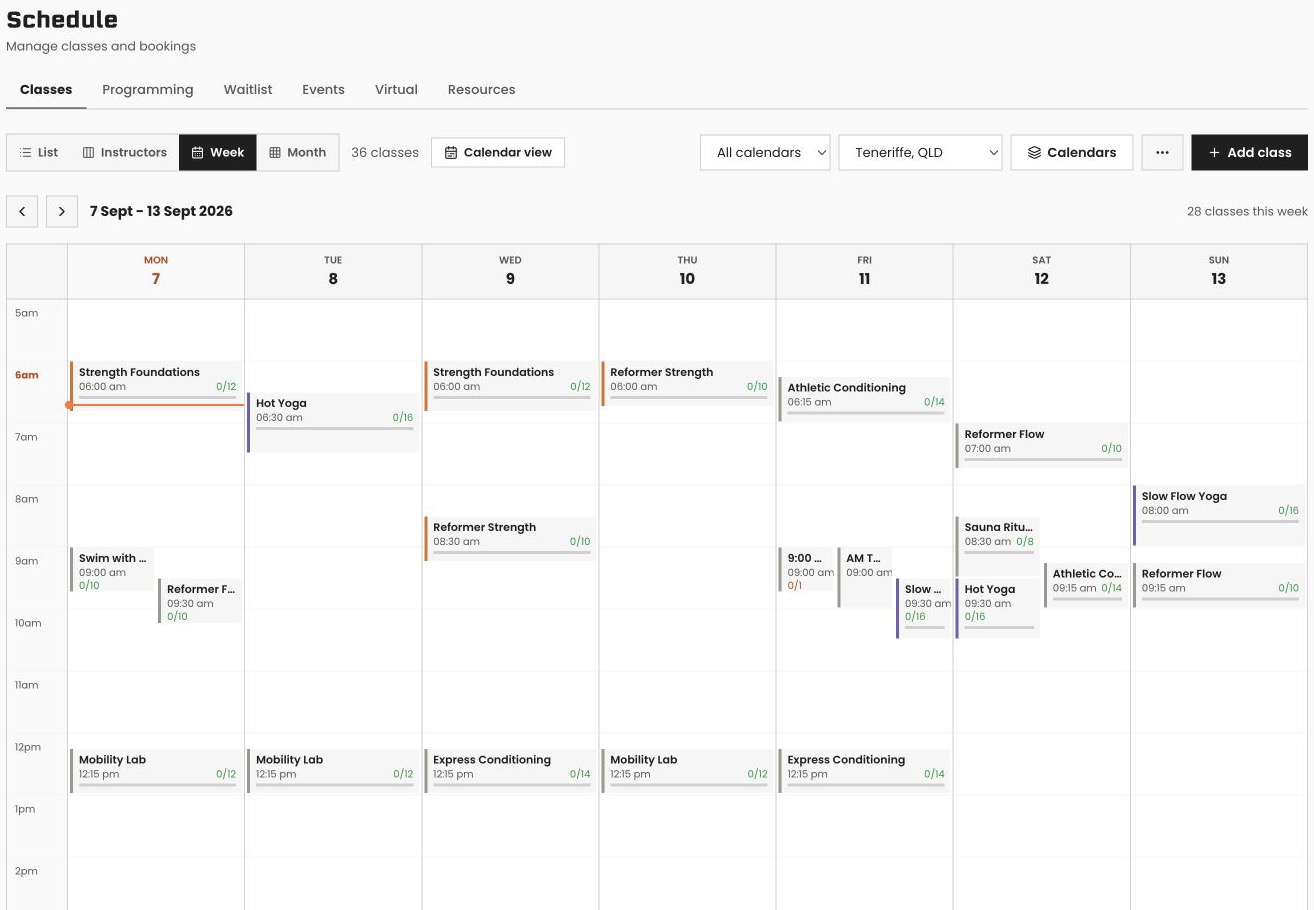
VERVE Pulse includes a fully featured scheduling engine on every plan, starting at A$166/month +GST (billed annually), with no per-member fees. The timetable builder supports recurring classes, instructor assignment, capacity limits, and real-time waitlists that automatically promote members when a spot opens, all bookable through the member app on iOS and Android.
Here is what the scheduling module covers inside VERVE Pulse:
- Class timetable builder: Set up recurring or one-off classes, define capacity, assign trainers, and publish to your live timetable in minutes.
- Member app bookings: Members book, cancel, and manage their own schedule from the iOS or Android app. No third-party app required.
- Waitlists with automatic promotion: When a cancellation comes in, the system moves the next waitlisted member into the class and notifies them automatically.
- Attendance tracking: Mark attendance at the door or via the self-serve kiosk. Every attendance record links back to the member profile.
- Appointments and tour booking: Prospects and members can book tours, PT consultations, and one-on-one appointments through the same interface.
- Public calendar feed: Publish a public-facing calendar feed so members can subscribe to your timetable in their preferred calendar app.
- QR check-in and kiosk: Members check in via QR code or the self-serve kiosk, keeping the front desk free for higher-value conversations.
- Live gym busyness and capacity: Members and staff can see how full the gym is in real time before heading in.
- Class reporting: See attendance rates, popular time slots, no-show rates, and revenue per class so you can optimise your timetable with actual data.
Because scheduling lives inside the same platform as the CRM, billing, and retention tools, every check-in and no-show automatically updates a member's at-risk score. If someone starts skipping their usual Tuesday class, VERVE Pulse flags them for a win-back sequence before they cancel. That closed loop between scheduling and retention is something bolted-together software stacks simply cannot replicate.
How does VERVE Pulse compare to other gym scheduling platforms?
Most international gym scheduling platforms do scheduling well but require separate tools for CRM, billing, and retention, meaning data lives in silos and staff waste time switching between systems. VERVE Pulse combines all of these in one platform, built specifically for Australian compliance, data residency, and payment methods.
| Feature | VERVE Pulse | Typical international platforms |
|---|---|---|
| Class timetable builder | Yes, included on all plans | Usually included |
| Member app (iOS and Android) | Yes, included on all plans | Often included or available as add-on |
| Waitlists with auto-promotion | Yes, fully automated | Varies by platform and plan |
| Built-in CRM with lead pipeline | Yes, full visual pipeline and AI lead scoring | Often a separate tool or basic only |
| AI churn prediction linked to attendance | Yes, at-risk scoring from attendance data | Rare; usually requires third-party integration |
| BECS direct debit (Australian bank accounts) | Yes, native | Rarely supported natively |
| GST-compliant invoicing | Yes, included | Varies; may need manual configuration |
| AWS Sydney data residency | Yes, all data stored in Australia | Often US or EU based |
| Per-member fees | None | Common; can become costly at scale |
| Equipment register and maintenance tracking | Yes, included on all plans | Rarely included |
| Migration concierge | Yes, on annual plans (VERVE does the migration) | Varies; often self-service |
If you want a deeper comparison of the Australian market, read our best gym CRM systems in Australia guide, or work through the gym software buyer's guide to map your specific requirements.
What VERVE Pulse pricing plan includes scheduling?
Every VERVE Pulse plan includes the full scheduling module with no per-member fees. Core starts at A$166/month +GST (billed annually), Grow at $349/month +GST, and Pro at $549/month +GST. Annual billing saves you two months, and every plan comes with a free demo, no obligation.
The difference between plans is not scheduling depth, it is the surrounding tools. Grow adds Google Calendar sync and Mailchimp integration. Pro adds the custom report builder, custom branded domain, Xero integration, and the open REST API. You can see the full breakdown on the VERVE Pulse pricing page.
Because there are no per-member fees, your scheduling costs stay predictable as your gym grows. A boutique studio with 80 members pays the same plan price as one with 800. Use our free revenue and ROI calculators to model what that looks like for your business.
How to choose the right gym scheduling software for your gym
Choosing the right gym scheduling software comes down to three questions: Does it handle your booking volume without per-member fees eating into margin? Does it sit inside your CRM so attendance data drives retention actions automatically? And is it compliant with Australian payment and privacy requirements?
Work through this checklist before you commit to any platform:
- Audit your current scheduling pain points. Is the problem booking volume, waitlist management, no-shows, or staff admin? Prioritise platforms that solve your actual constraint.
- Check data residency. Australian Privacy Act obligations are easier to meet when your data stays on Australian servers. VERVE Pulse uses AWS Sydney.
- Verify payment method support. BECS direct debit is the standard for Australian gym memberships. Confirm any platform supports it natively before signing up.
- Calculate true cost at scale. Per-member fees from international platforms can double or triple your effective cost as membership grows. Flat-fee models are far more predictable.
- Ask about migration support. Switching platforms is the hard part. VERVE Pulse offers a white-glove migration concierge on annual plans with import presets for Mindbody, Glofox, Zen Planner, PushPress, Hapana, and CSV files.
- See it before you commit. Book a free demo and our team will build out your timetable live, so you can confirm it fits your workflow.
If you want to understand the CRM side of the platform before diving into scheduling, start with what is a gym CRM or visit the gym CRM Australia page for locally relevant context.
Frequently Asked Questions
Does VERVE Pulse charge extra for scheduling features?
No. The full scheduling module, including the class timetable builder, online bookings, automated waitlists, attendance tracking, and the member app, is included on every plan. Core starts at A$166/month +GST (billed annually) with no per-member fees.
Can members book classes through their phone?
Yes. VERVE Pulse includes a member mobile app for both iOS and Android. Members can browse the timetable, book or cancel classes, join waitlists, and check in via QR code, all from their phone without needing to contact reception.
How does the waitlist work in VERVE Pulse?
When a class reaches capacity, members can join the waitlist through the app. If a booked member cancels, VERVE Pulse automatically promotes the next person on the waitlist and sends them a notification. No manual intervention is required from staff.
Can I migrate my existing class schedule and member data from another platform?
Yes. VERVE Pulse has import presets for Mindbody, Glofox, Zen Planner, PushPress, Hapana, and CSV files. On annual plans, the white-glove migration concierge means VERVE's team handles the migration for you so you are not rebuilding from scratch.
Is VERVE Pulse scheduling suitable for multi-location gyms?
Yes. Multi-site management is available as an add-on, allowing you to manage timetables, bookings, and attendance across multiple locations from a single dashboard while keeping member data and reporting separate per site.
How does attendance tracking connect to member retention?
Every check-in and no-show recorded through the scheduling module feeds directly into VERVE Pulse's AI churn prediction engine. Members who start attending less frequently are automatically flagged as at-risk, triggering win-back automations before they cancel. This closed loop between scheduling and retention is built in, not bolted on.
Ready to see VERVE Pulse for yourself?
Book a demo and our team will walk you through the CRM, AI lead scoring, and the whole gym platform underneath it, live and tailored to your gym.